
What is an ICE contact? Meaning, set-up and why a wearable helps

In short
- ICE stands for In Case of Emergency: a contact saved under ICE so that a helper knows who to call.
- The idea came from Bob Brotchie, a paramedic with the East Anglian Ambulance Service, and was launched in May 2005.
- Today, add your ICE contacts to Medical ID (iPhone) or emergency information (Android) and show them on the lock screen.
- A locked, flat or lost phone hides your ICE contact, so also carry it on something any helper can scan.
An ICE contact is someone you have saved in your phone under "ICE", short for In Case of Emergency. If you are injured or taken ill and can't speak, a paramedic, police officer or passer-by can look for ICE and know straight away who to call.
To set one up today, save the person with ICE in front of their name, and add them as an emergency contact in Medical ID on your iPhone or in the emergency information on your Android phone. Then turn on the option to show it on the lock screen. Without that step, nobody can reach your ICE contact while your phone is locked.
What does ICE stand for?
ICE stands for In Case of Emergency. It isn't a service or an app. It is an agreement about how you name a contact, so that a stranger can recognise it quickly.
If you have more than one emergency contact, number them: "ICE 1 Sarah (partner)", "ICE 2 Tom (brother)". That shows who to call first and who they are; "Sarah" on its own tells a stranger very little.
Where does the ICE idea come from?
The idea started in England. According to a BBC News report from 12 July 2005, it was the brainchild of Bob Brotchie, a paramedic with the East Anglian Ambulance Service, and it was launched in May that year.
Brotchie told BBC Radio 4 that he had attended calls where patients couldn't speak because of injury or illness, and nobody could find out who they were. Since most people carried a mobile, one standard way of finding an emergency contact in a phone would help everyone. The campaign took off after the London bombings of 7 July 2005, and he said the idea had spread as far as the USA and Australia.
Phones have changed since 2005: most are now locked with a passcode, fingerprint or face, which puts the contacts list out of reach. Apple and Google now offer emergency features that work from the lock screen.
How do you set up an ICE contact on your phone?
These steps work on any phone:
- Choose your emergency contact and ask whether they are happy to be it.
- Save them in your contacts with ICE in front of the name and the relationship after it: "ICE 1 Sarah (partner)".
- Enter the number in international format, such as +44, +31, +32 or +34. A local helper can then dial it without having to work out the country code.
- Add the same person as an emergency contact in your phone's built-in emergency feature.
- Turn on the option that shows it on the lock screen.
The last two steps matter most.
On an iPhone
According to Apple's iPhone User Guide, you open the Health app, tap your picture and tap Medical ID. Tap Edit, then below Emergency Contacts tap Add Emergency Contact and choose the person. Scroll to the bottom, turn on Show When Locked and tap Done. Apple also notes that after an emergency call ends, your iPhone sends your emergency contacts a text message, unless you cancel it.
On Android
In Google's Safety app, tap Your info, then Emergency contacts and Add contact, according to Google's Android Help. Under Emergency info access, choose Show when locked. On a Samsung Galaxy, you go to Settings, Safety and emergency, Emergency contacts, tap Add member and turn on Show on Lock screen.
All the steps, including medical details, are in how to set up Medical ID on iPhone and Android.
Who should be your ICE contact?
Not everyone is equally suited. Look at:
- Reachability. Someone who usually answers their phone, during the day as well. If your family lives in another time zone, a call in the middle of their night may go unanswered.
- What they know. Your contact knows which medication you take, who your doctor is and who else should be told.
- Distance. A neighbour can be there quickly; a sister in another country may know more. With two or three contacts you cover both.
If you live abroad, make at least one contact someone local who speaks the language and can get to a hospital quickly. And talk to the people you choose: what may they pass on about your health, and who should they call in turn?
Why an ICE contact on your phone often isn't enough
An ICE contact depends entirely on your phone, and in an emergency all sorts of things can be wrong with it:
- The lock screen option is off. Then everything stays behind your passcode.
- The battery is flat. After a long day or a cold walk, a phone shows nothing at all.
- The phone is broken or gone. After a fall from a bike it may be damaged or lying some distance away.
- You didn't take it. A run, a swim or a quick walk with the dog often happens without a phone.
- The helper doesn't know where to look. Not everyone knows about Medical ID or emergency information, and on an unfamiliar phone, set to a language that isn't theirs, it takes time to find.
So carry your emergency contact outside your phone too: a card in your wallet, or something any helper can scan with their own phone.
Why a wearable helps when your phone is locked or flat
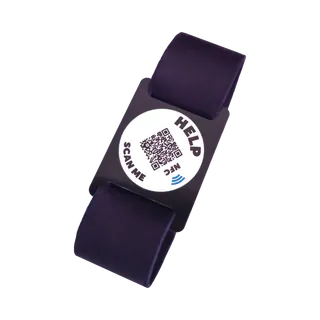
An ICESCAN is a bracelet, key ring, sticker, brooch or pet tag with an NFC chip and a QR code. Whoever helps you holds their own phone against it or scans the QR code with the camera. Your emergency page opens in their browser, and from there they can call or email your contacts with one tap.
That works independently of your phone. Whether yours is locked, flat or at home, your contact can still be found. There's no app to install, for you or for whoever scans, and no battery to run down. The helper's phone does need an internet connection, because your details are fetched online.
- You can add up to five contacts, so ICE 1 to ICE 5.
- You decide what is visible, and you can protect sensitive sections with a password.
- The emergency page appears in Dutch, English or Spanish, depending on the language of the phone that scans it.
If you always have your keys with you, the key ring is the easy option. For sport, the bracelet stays on your wrist. All versions are in the shop.
Keep your ICE contacts up to date
An old number helps nobody. Pick a fixed moment to check your emergency contacts, such as when the clocks change in spring and autumn, and check:
- that the numbers are still right;
- that your contacts are still happy to be on the list;
- that the medication and allergies in your Medical ID are current;
- that Show When Locked is still on after an update or a new phone.
Details on an ICESCAN don't depend on your phone, so they stay put when you change handsets. What else to record is covered in what emergency information to include.
Frequently asked questions
Do paramedics always look for an ICE contact in my phone?
You can't count on it. Paramedics have their hands full with your care, and a locked phone is hard to search. Make sure your contact can be found in several places: in your contacts, on your lock screen and on something you wear.
Does ICE work abroad?
The abbreviation isn't tied to one country, and the idea spread beyond the UK soon after it was launched. What matters more abroad is the number: save it with the country code, so a local helper can call it directly. If you live in the Netherlands, Belgium or Spain, read emergency numbers and medical information abroad.
Can I use a landline as my ICE number?
You can, but a mobile number is usually more practical, because a landline often goes unanswered during the day. If you do give a landline, add a mobile number for the same person or a second contact.
Is it safe to show my ICE contact on the lock screen?
Anyone who picks up your phone can see it. For the name and number of someone close to you, that's usually fine, and in an emergency it is exactly the point. Don't add anything you would rather keep private. On an ICESCAN you can put sensitive sections behind a password.
Goes with this article
All ICESCANs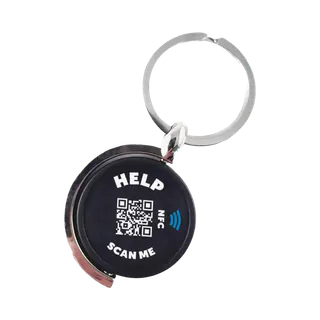
Key ring
For your keys
Now €29.95
Regular price €34.95Temporarily out of stock
Bracelet, 19 cm
Adults · black
Now €29.95
Regular price €34.95


