How to set up Medical ID on your iPhone or Android phone, step by step

In short
- iPhone: open the Health app, tap your picture, tap Medical ID and turn on Show When Locked.
- Android: open the Safety app, tap Your info, add medical information and emergency contacts, then choose Show when locked.
- Samsung: go to Settings, Safety and emergency, fill in Medical info and Emergency contacts and turn on Show on Lock screen.
- A bracelet or key ring with your emergency information still works when your phone is flat, broken or not with you.
Your phone can show your allergies, medication and emergency contacts on the lock screen, without anyone needing your passcode. On an iPhone you set up Medical ID in the Health app; on Android you use the Safety app or your phone's settings.
Below are the steps for each type of phone, checked against the support pages of Apple, Google and Samsung, followed by how a helper finds your details and when your phone alone isn't enough.
What is Medical ID on a phone?
Medical ID is a card with details that matter in an emergency: your name, medical conditions, allergies, medication and the people who should be called. Apple calls it Medical ID; on Android it is called emergency information, and Samsung calls it Medical info.
The key setting is a single switch: show it on the lock screen. With it off, only you can see your details. With it on, anyone who picks up your phone can open them, which is the point, so only add what a stranger may read.
How to set up Medical ID on an iPhone
According to Apple's iPhone User Guide, it works like this:
- Open the Health app.
- Tap your picture, then tap Medical ID.
- Tap Get Started or Edit, then enter your information, such as medical conditions, allergies and medication.
- Below Emergency Contacts, tap Add Emergency Contact and choose a contact. Add the relationship as well, such as partner or daughter.
- Scroll to the bottom and turn on Show When Locked.
- Tap Done.
Apple mentions two more things worth knowing. After an emergency call ends, your iPhone alerts your emergency contacts with a text message, unless you cancel it. And automatically sharing your Medical ID during an emergency call only works in the US and Canada, according to Apple. If you have moved from either country to Europe, that is easy to miss: when you call 112 in the Netherlands, Belgium or Spain, your Medical ID does not go along by itself.
How does a paramedic see your Medical ID on a locked iPhone?
Apple describes it like this: someone who wants to help swipes up on the Lock Screen (on an iPhone with Face ID) or presses the Home button (on iPhone SE). On the passcode screen they tap Emergency, then Medical ID.
To check what others will see, touch and hold the Health app icon on your Home Screen and choose Medical ID. According to Apple, your Medical ID also appears on the lock screen of your Apple Watch.
How to set up emergency information on Android
On many Android phones you use Google's Personal Safety app. In your list of apps it simply shows as Safety. These are the steps from Google's Android Help:
- Open the Safety app and sign in to your Google Account.
- Tap Your info.
- Tap Medical information and fill in what you want to share, such as blood type, allergies or medication.
- Tap Emergency contacts, then Add contact, and choose an existing contact.
- Tap Emergency info access and choose Show when locked.
Google itself points out that anyone who picks up your phone can find this information, even when it is locked. Some steps only work on Android 12 and later. The same page also mentions an option to share your details during an emergency call, but doesn't say which emergency services receive them. So don't assume the control room in your country gets them automatically.
A Samsung Galaxy works slightly differently
Samsung has its own menus. According to Samsung UK support, you open Settings and go to Safety and emergency:
- For contacts, choose Emergency contacts, tap Add member, select a contact and tap Done.
- For medical details, choose Medical info, enter what you want to share and tap Save.
- In both screens, turn on Show on Lock screen.
Samsung notes that screens may vary depending on the model. If you can't find the menu, type "medical" into the search bar in Settings.
How does someone view your emergency information on Android?
On an Android phone with the Safety app, a helper swipes up on the locked screen, taps Emergency and then View emergency info. On a Samsung, they tap Emergency call on the unlock screen and then View medical info.
So the labels differ by brand and version: a small detail for you, but not for a passer-by holding your phone for the first time.
What should you put in your Medical ID?
Keep it short and useful. Whoever helps you will read it in a few seconds:
- Emergency contacts: two or three people who usually answer, with the number in international format (+44, +31, +32 or +34 and so on).
- Medical conditions that matter in an emergency, such as diabetes, epilepsy or a heart condition.
- Medication you take daily, with name and dose.
- Allergies and what happens when you react, plus whether you carry an adrenaline auto-injector.
Leave out ID numbers and your address. There is a full checklist in what emergency information to include.
Why your phone alone isn't always enough
Medical ID is a good start, and it costs nothing. Still, there are situations in which nobody gets to those details:
- The phone is flat or broken. A dead battery after a long day, or a cracked screen after a fall from your bike.
- The phone isn't with you. On a run, in the swimming pool or on a quick walk with the dog.
- The helper doesn't know where to look. Not everyone knows there is a Medical ID behind the Emergency button, and on an unfamiliar brand it takes time to find.
- Your child doesn't have a phone. For young children this solution doesn't work at all.
The same goes for an ICE contact in your contacts list. What is an ICE contact explains why that on its own often falls short.
A bracelet or key ring as a back-up
Something on your wrist or your keys fills those gaps. An ICESCAN has an NFC chip, a QR code and the words HELP and SCAN ME. Whoever scans it with their own phone sees the details you have filled in and can call your emergency contacts with one tap, whether your phone is flat or at home.
No app is needed, either for you or for whoever scans it, but their phone does need an internet connection. The emergency page appears in Dutch, English or Spanish, depending on the language of the phone that scans it. You can choose from a black bracelet in 19 cm, the same bracelet in 16 cm or a key ring, among others. How scanning works is explained in NFC vs QR code.
Keep the same emergency contacts in your Medical ID and on your ICESCAN, and update both together.
Frequently asked questions
Can anyone see my Medical ID if it shows on the lock screen?
Yes. Anyone who picks up your phone can open those details without your passcode, as both Apple and Google point out. So only add what a stranger may read. If you turn the lock screen option off, only you can see your details, but a helper can't use them either.
Does my phone send my medical information when I call 112?
On an iPhone, Apple says automatic sharing of your Medical ID during an emergency call only works in the US and Canada. Android can send your location during an emergency call if Google's Emergency Location Service works in your country and on your network. Assume that the emergency control room does not receive your medical details automatically.
How often should I update my Medical ID?
Every time something changes: a new medicine, a different dose, a new number for one of your contacts. Also check once or twice a year, and after you set up a new phone. An old number or a medicine you've stopped taking can send a helper the wrong way.
What's the difference between Medical ID and an ICE contact?
An ICE contact is an ordinary entry in your address book with ICE in front of the name. On a locked phone, a helper usually can't get to it. Medical ID is a feature of the phone itself and, if you turn it on, sits behind the Emergency button on the lock screen. It can also show your allergies, medical conditions and medication.
Goes with this article
All ICESCANs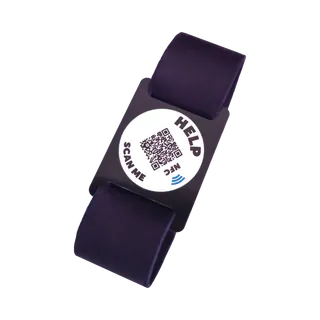
Bracelet, 19 cm
Adults · black
Now €29.95
Regular price €34.95-
Bracelet, 16 cm
Adults · black
Now €29.95
Regular price €34.95 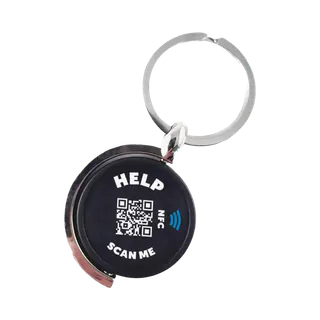
Key ring
For your keys
Now €29.95
Regular price €34.95Temporarily out of stock


