What emergency information should you include? A practical checklist

In short
- Start with two or three emergency contacts who usually answer their phone. That is the most important part.
- Then add medical conditions, medication with the dose, allergies and devices such as a pacemaker or insulin pump.
- Put sensitive details behind a password and always leave out bank details, logins and ID numbers.
- Check your emergency information whenever something changes, and otherwise once or twice a year.
Good emergency information answers two questions for whoever is helping you: who should I call, and what do I need to know about this person? So start with your emergency contacts. Then add what a paramedic needs in the first few minutes: medical conditions, medication, allergies and any devices you rely on.
Leave out anything that doesn't help in an emergency, such as your passport number, bank details or passwords. Below we go through each section, with a few extra points if you live abroad.
Which emergency information matters most?
Picture this: you feel faint in the street and can't speak. A passer-by calls 112 and wants to reach your family; a paramedic wants to know about medication and allergies. Both need only a few lines.
A sensible order:
- Emergency contacts
- Medical conditions that matter in an emergency
- Medication, with the dose
- Allergies and what happens when you react
- Devices and implants
- Your wishes on resuscitation and organ donation
- Insurance and anything else worth knowing
None of it is compulsory. A profile with just two good contacts is already worth a lot.
Who should be your emergency contacts?
Choose people who usually pick up and who know something about your situation. That is often a partner, a grown-up child or a close friend. Two or three is a good number, so there is always someone to reach.
- Put the most important person first. Whoever scans will usually call the first name.
- Add the relationship, such as "partner" or "daughter", so the helper knows who they are talking to.
- Use the international format, such as +44 7700 … or +31 6 …, so the number works from any phone, including a local one.
- Ask first. Let your contacts know they are on your profile, and tell them the password for any protected details.
If your family lives in another country, add a contact nearby as well. A friend 20 minutes away can be at your side long before your parents can get on a flight.
Medical conditions, medication and allergies
This is the part a paramedic gets the most out of. Keep it short and specific.
Medical conditions. Mention what makes a difference in an emergency, such as diabetes, epilepsy, a heart condition, asthma or dementia. An old knee operation can stay off.
Medication. Write down the name and the dose, as they appear on the pharmacy label. Brand names vary from country to country, so if you take medicine you brought from home, add the active ingredient as well. Your pharmacist can print an up-to-date overview.
Allergies. Say what you are allergic to and what happens when you react. If you carry an adrenaline auto-injector, note that too, and where you keep it. There is more on this in allergies and emergency information.
Blood type, devices and implants
You can add your blood type, but don't expect too much from it. Hospitals test your blood themselves before a transfusion; the NHS explains that your blood is tested against donor cells first. They won't rely on a profile.
Devices and implants matter more. Think of a pacemaker, an ICD, an insulin pump, a hearing aid or a cochlear implant. "Wears contact lenses" or "pregnant" can also be useful for a paramedic to know. In ICESCAN you add these under Special devices and in the fixed fields of your personal information.
Resuscitation wishes and organ donation
You record both officially elsewhere, under the rules of the country where you live. Your profile can only point to that record.
Do not resuscitate. Arrange this with your own doctor. Your profile can mention that you have such a document and where it is kept.
Organ donation. In the Netherlands, for example, the Donor Register includes adults registered with a Dutch municipality. People who move there are entered after living in the country for three years: they get a reminder letter, and if they don't respond, "no objection to organ donation" appears next to their name, according to the Donor Register's page for newcomers. The register is what counts, not your profile.
Insurance and anything else worth knowing
Your health insurer and policy number come in handy mainly when you are travelling or when family need to sort things out. If you live abroad and have both a local and an international policy, say which is which.
Anything else worth knowing covers lines such as "hard of hearing", "speaks English, little Dutch" or "sole carer for a disabled child". They help someone approach you the right way, or tell them that someone at home depends on you.
What should be public and what should go behind a password?
Assume that anything public on your profile can be read by a stranger. With ICESCAN you can protect sensitive sections with a password. A helper then sees the message "Ask for the password to view more data", and can get the password from the contact they are calling.
| Public | Behind a password | Leave out |
|---|---|---|
| Emergency contacts and relationship | Detailed medical history | Passport, ID or social security numbers |
| Conditions that matter straight away | Insurance and policy number | Bank or card details |
| Medication and allergies | Sensitive diagnoses you'd rather not share | Logins and passwords |
| Devices such as a pacemaker | Other personal notes | Your home address, unless needed |
Not sure? Make public what a paramedic needs in the first few minutes, and protect the rest. The FAQ explains who can see what.
Where should you keep your emergency information?
Your phone has a built-in place for emergency information. How to fill it in is covered in Medical ID on iPhone and Android. The catch: a helper can only get to it if your phone is intact, charged and with you, and if they know where to look. An ICE contact in your contacts list is also hard to find on a locked phone.
An ICESCAN is something you wear separately from your phone. Whoever scans it sees your emergency information in their browser and can call your contacts with one tap, without an app. Their phone does need an internet connection. You choose what suits you: a key ring goes everywhere with you, a bracelet stays on your wrist and a brooch sits on your coat or cardigan. Your details are stored encrypted, and even we can't simply look at them.
Keep your emergency information up to date
Update your profile as soon as something changes:
- you start or stop a medicine, or the dose changes;
- a contact gets a new number or will be hard to reach for a while;
- you get a new diagnosis or a new device;
- you move house, move country or set off on a long trip.
Add a yearly reminder too, for example on your birthday. You change your details through My ICESCAN, with a login code sent by email.
Frequently asked questions
Do I have to fill in every section?
No. Nothing is compulsory, and a short profile is often better than a long one. A helper reads your details under pressure, so the less clutter, the faster they find what counts. Start with your contacts and add more later if you want.
Can I keep a profile for my child or a parent?
Yes. Every ICESCAN has its own code and profile, so you can activate one for your child or a parent, manage the details yourself and put yourself down as the first contact. For children, see ID bracelets for children.
What happens to my details if I lose my tag?
The tag itself holds no data, only a link with a unique code. If you lose it, forward the activation email you received when you linked it to ICESCAN, and the tag will be unlinked from your details. So keep that email somewhere safe. The FAQ has more.
Which language should I write my emergency information in?
The fixed parts of the emergency page appear in Dutch, English or Spanish, depending on the language of the phone that scans it. What you type yourself appears exactly as you wrote it. If you live in the Netherlands, Belgium or Spain, short and simple English is a good choice, perhaps with your main condition or allergy repeated in the local language. Copy medicine names exactly from the label. There is more on this in emergency numbers and medical information abroad.
Goes with this article
All ICESCANs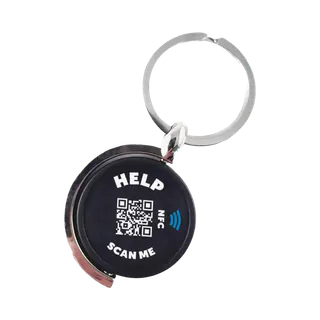
Key ring
For your keys
Now €29.95
Regular price €34.95Temporarily out of stock
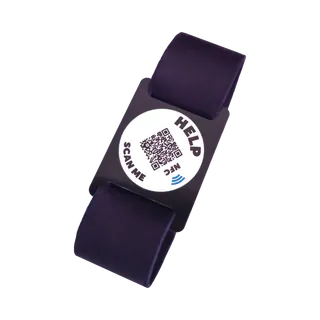
Bracelet, 19 cm
Adults · black
Now €29.95
Regular price €34.95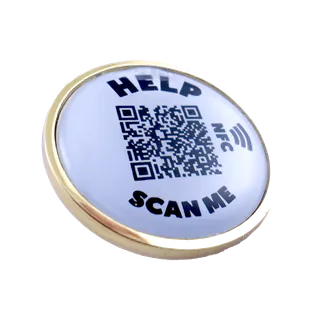
Brooch
Gold-coloured · for your coat
Now €29.95
Regular price €34.95


