A child ID bracelet with your phone number: why, which one and what to put on it

In short
- Many young children don't know their parents' phone number by heart. A bracelet covers that gap.
- Choose one that is comfortable, easy for a helper to spot and lets you update the details.
- Add at least two contacts who can be reached and keep other details to a minimum.
- Practise with your child: stay where you are, find someone who works there and show your bracelet.
A child who has lost their parents suddenly has to do two difficult things: speak to a stranger, and explain how to reach mum or dad. A child ID bracelet with your phone number takes care of the second part. Your child only has to show their wrist, and whoever helps can call you straight away.
A bracelet like this is most useful in busy places: a theme park, the beach, a festival, an airport or a holiday flat abroad. Below you'll read why it works, which types there are, what to look for and how to teach your child to ask for help.
Why a child ID bracelet with your phone number?
To a young child, a phone number is a long, abstract string of digits. Research by the Netherlands Red Cross found that 63 per cent of children aged 4 to 6 don't know their parents' or carer's phone number by heart. The Red Cross therefore suggests giving your child the number to carry, on a wristband for example, so they only need to show it.
On top of that, a child who has lost you is often frightened or in tears. Even a child who knows your number perfectly well may not manage to say it at that moment.
For families who live abroad there is a third reason: language. A five-year-old who speaks English at home may not be able to explain anything to a Spanish lifeguard or a Dutch shop assistant. A bracelet doesn't need words. Some Spanish coastal cities have picked up on this too: in Valencia, for instance, the local police and the Red Cross hand out water-resistant ID wristbands at the beach, showing the name and phone number of the responsible adult.
What types of ID bracelets are there?
Broadly, there are three types, each with pros and cons.
| Type | Advantage | Disadvantage |
|---|---|---|
| Paper or plastic wristband you write on | cheap and quick | ink fades, and you need a new one for every outing |
| Bracelet with an engraved number | lasts a long time | if your number changes you need a new one; anyone can read your number |
| Bracelet with a QR code and NFC chip | you can update the details; room for several contacts | the helper needs a smartphone with internet |
Which suits you depends on how often you'll use it. For one day at the beach, a wristband from the lifeguard post is fine. If you go out often, travel a lot or want more than one number on it, a bracelet you can update is more practical.
What should you look for in a child ID bracelet?
A bracelet that stays in the bag helps nobody. So look at:
- Comfort. An elastic band goes on easily, isn't too tight and can be worn all day without your child pulling at it.
- Visibility. A helper needs to see that there is something on it. Clear words such as HELP tell a stranger what it is for.
- Durability. Sand, water and falls in the playground are part of childhood. Check the product information to see what the bracelet can handle.
- Easy to update. Numbers change, and on holiday you may want to add the number of your hotel or of grandparents. An engraved bracelet can't do that.
- Privacy. Anything printed on the bracelet can be read by anyone. Leave off your surname, address and school.
What should you put on the bracelet or profile?
Stick to what someone needs in the first few minutes. More isn't better: a helper reads it standing up, with a crying child next to them.
- Emergency contacts. At least two people who can usually be reached, such as both parents, in international format (+31, +32, +34, +44 and so on). Add someone who isn't on the outing with you, such as a grandparent or neighbour. The Red Cross also recommends agreeing who will be called if neither parent picks up.
- Your child's first name. It helps a helper to reassure them.
- Allergies or medication, if any. For example a nut allergy, or a child who uses an inhaler.
- Anything a helper should know, such as "speaks English and a little Spanish" or "frightened of loud noises".
If you're unsure what to make public, read what emergency information to include.
How do you teach your child to ask for help?
A bracelet works best if your child knows what to do. Practise a few times, calmly and without making it scary. Turn it into a game: "What do you do if you lose us in the supermarket?"
- Stay where you are, or go to the meeting point. When you arrive somewhere, agree on a spot that's easy to recognise, such as the entrance or a big ride.
- Find someone who works there. A park employee, someone at a till or a lifeguard. If that doesn't work, another parent with children.
- Say "I've lost my mum or dad" and show your bracelet.
Teach your child your number as well. The Red Cross suggests linking the digits to something meaningful, like a birthday, or singing them to a tune. That way your child has two routes: their memory and their wrist.
Also tell them that getting lost is never their fault and that you won't be cross. A child who is afraid of being told off is more likely to go looking on their own than to ask for help.
How the ICESCAN children's bracelet works
The ICESCAN children's bracelet comes in pink and blue. The band is elastic and waterproof, and the QR code is scratch-resistant. Because of its size, we recommend it for children up to 7; older children will probably find the adult bracelet in 16 cm more comfortable, which is elastic too.
Whoever helps your child scans the QR code with their camera or holds their phone against the tag. The emergency page opens in the browser with the details you have filled in, and with one tap they can call one of your contacts. You can add up to five.
- No app and no subscription, for you or for whoever scans.
- Easy to update. In My ICESCAN you log in with a code sent by email. A new number or a holiday address takes a few minutes.
- Protect sensitive details. Medical details you don't want everyone to see can go behind a password.
- Works on holiday. The emergency page appears in Dutch, English or Spanish, depending on the language of the phone that scans it.
The helper's phone does need internet, because the tag only holds a link to your details. Activate the bracelet as soon as it arrives and scan it yourself once, so you see what a helper will see. How scanning works is explained in NFC vs QR code.
Frequently asked questions
From what age is a child ID bracelet useful?
There's no fixed age. A bracelet helps most while your child can't reliably say your number, so with toddlers and young children. Older children who go to school or sport on their own can benefit too: after a fall from a bike, a passer-by can quickly call a parent. Mainly, check that your child likes wearing it.
Can the children's bracelet go in the pool or the sea?
According to the product information, the ICESCAN children's bracelet is waterproof and the QR code is scratch-resistant. So it can stay on for swimming, at the beach and in the rain. Rinse off sand and salt water afterwards and check now and then that the band still fits well.
Isn't it risky for a stranger to see my phone number?
Whoever finds your child needs to be able to call you, so your number is the whole point. It isn't printed on the bracelet, but on the emergency page that the QR code and chip link to. Assume that anyone who opens that page sees everything you have made public. Keep other details limited, leave out things like an address or school, and put medical details behind a password.
Can I put the same details on more than one bracelet?
Yes. Every ICESCAN has its own code, so you activate each one separately and fill in the details per bracelet. That way each child can have their own bracelet with their own first name and notes. The FAQ explains how.
Goes with this article
All ICESCANs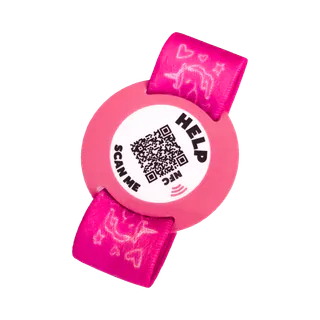
Kids' bracelet, pink
For children · stretchy
Now €29.95
Regular price €34.95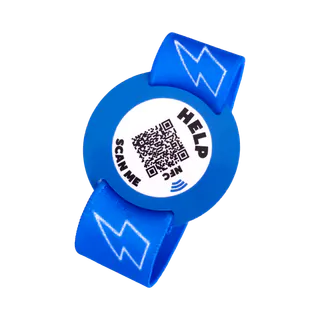
Kids' bracelet, blue
For children · stretchy
Now €29.95
Regular price €34.95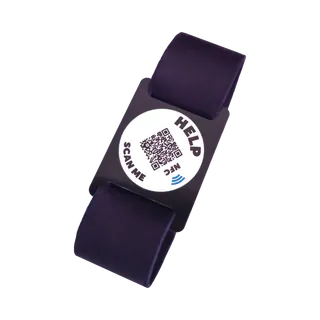
Bracelet, 16 cm
Adults · black
Now €29.95
Regular price €34.95


