Running, walking or cycling alone: how to be identifiable and reachable in an emergency

In short
- Tell someone where you're going and roughly when you'll be back, and agree what they'll do if you don't check in.
- Carry something that tells helpers who you are and who to call, even when your phone is locked, flat or broken.
- An emergency bracelet on your wrist or a sticker on your helmet goes with you, without a wallet or ID card.
- Fill in your emergency contacts, conditions, medication and allergies, and keep them up to date.
If you run, walk or cycle alone, make sure of two things: someone knows where you are, and anyone who finds you can see who you are and who to call. Most people go out with just a phone and a key. That phone is often locked, and after a fall it may be broken or out of reach. Something on your body that tells helpers what they need to know closes that gap.
This isn't about fear. You will probably never need it. But the few minutes it takes to set up make a real difference to the people helping you, and to the people at home waiting for you.
Why is it hard to identify someone who's out running or cycling?
Picture a cyclist who has come off their bike on a quiet road, or a runner who feels unwell on a towpath. A passer-by calls 112 and stays with them. The paramedics arrive. Then come the questions: what's this person's name, do they have any conditions, are they on any medication, and who should we call?
Someone who's out exercising often carries no wallet, no ID card and no paper with an emergency number on it. And a phone isn't a reliable answer:
- it's locked, and a stranger doesn't know the code;
- it may be damaged in a fall or lying somewhere else;
- the battery may be flat after a long ride;
- not every bystander knows where to find the medical information on a lock screen.
That's why it's wise to carry your emergency information in a way that doesn't depend on your own phone.
Step 1: tell someone your route and when you'll be back
The simplest step costs nothing. Before you set off, send a message to someone you trust: where you're going, roughly how long you'll be and when you expect to be home. Agree what they'll do if they haven't heard from you by a certain time: first call you, then go and look or call for help.
Many sports watches and apps let you share your location live with someone. That's useful, but it only works if your device is charged and has a signal. See it as an extra, not a replacement for a clear agreement.
Step 2: carry emergency information that works without your phone
The basics are the same as on any emergency profile:
- Your name and date of birth.
- Two or three emergency contacts who usually answer their phone. You can read how to choose them in what an ICE contact is.
- Conditions that matter in an emergency, such as asthma, diabetes, epilepsy or a heart condition.
- Medication, with the dose, and especially blood thinners.
- Allergies, for example to medicines or wasp stings.
- Devices, such as a pacemaker or an insulin pump.
Make sure this information is somewhere a helper will find it. Your wrist, your helmet and your keys are the places people look. The emergency information checklist helps you decide what to include and what to keep behind a password.
Step 3: choose what suits your sport
Running and walking. An emergency bracelet stays on your wrist, whether you're running in shorts with no pockets or walking the dog. The ICESCAN bracelet has no battery and is waterproof, so sweat and rain don't matter. It comes in 19 cm and 16 cm.
Cycling. A helmet is where a paramedic looks. ICESCAN stickers come in a pack of two: one for your helmet, one for your bike, your child's helmet or your rucksack. Many cyclists combine a sticker with a bracelet, because after a fall the helmet sometimes comes off.
Keys. If you always take your keys, a key ring is an easy extra. It's less visible than a bracelet, but it is always with you.
All of these work the same way. The bracelet, sticker and key ring carry HELP and SCAN ME, with an NFC chip and a QR code. Whoever helps you holds a phone against it or scans the code with the camera. Your emergency page opens in the browser, with your details and buttons to call your contacts with one tap. No app is needed, but the phone that scans does need internet.
Step 4: also set up your phone's Medical ID
Your phone can show medical information and emergency contacts on the lock screen, without the code. It takes a few minutes and is worth doing as an extra layer, provided your phone is intact and the person helping you knows where to look. How to set it up on an iPhone or Android phone is covered in Medical ID on iPhone and Android.
What's different if you exercise abroad?
Lots of people from the Netherlands and Belgium go cycling or walking in Spain, and plenty of English speakers live and train in those countries. A few things to know:
- 112 works everywhere in the EU. According to the European Commission, it is free and you can call it from mobile and fixed phones. In the UK, 999 also works.
- Language. The fixed parts of the ICESCAN emergency page appear in Dutch, English or Spanish, depending on the language of the phone that scans it. So a Spanish passer-by sees Spanish headings and buttons. Anything you've typed yourself appears as you wrote it, so consider adding a short line about any serious condition in the local language too.
- Signal. In the mountains or rural areas there isn't always mobile coverage. The phone that scans needs internet to open your emergency page. Tell someone your route, especially on remote routes.
More about this in emergency numbers and medical information abroad.
Frequently asked questions
Doesn't a stranger need an app to scan?
No. Almost any smartphone can scan it: the QR code with the camera, or NFC by holding the phone against it. Your emergency page then opens in the browser. More on this in the FAQ.
Will I be notified when someone scans my bracelet?
No. ICESCAN doesn't send a notification and doesn't share a location when someone scans. What it does do is let the person helping you call your contacts with one tap, straight from your emergency page.
Can I keep some details private?
Yes. You decide what you fill in, and you can protect sensitive sections with a password. Helpers then see a message asking them to request the password. Keep your contacts and the most important medical points visible, though. See who can see your details.
What does it cost?
You pay once for the bracelet, sticker or key ring. There's no subscription and no extra costs, and delivery to the Netherlands, Belgium and Spain is free. Have a look in the shop.
Goes with this article
All ICESCANs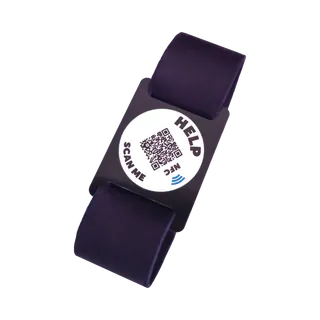
Bracelet, 19 cm
Adults · black
Now €29.95
Regular price €34.95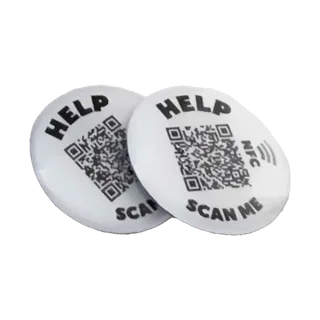
Stickers, pack of 2
For a helmet, bike or rucksack
Now €29.95
Regular price €34.95-
Bracelet, 16 cm
Adults · black
Now €29.95
Regular price €34.95


